
Tips for Chatting with Hallie
I want you to get the most out of Ask Hallie, so I put together a few tips on how to actually use it. None of this is required, you can absolutely just start typing and figure it out as you go.
But these five small things will make the experience a lot richer, especially when it comes to finding the shoppable content hidden inside answers.




1. Talk to Hallie like you'd talk to a friend
You don't need to phrase questions formally or carefully. Just share what's going on. The more context you give, the more the answer will actually fit your life.
Instead of
What should I wear to a wedding?
Try
I have an outdoor wedding in August in Florida. The dress code says cocktail. I'm 52, prefer covered shoulders, and I want to feel comfortable enough to dance.
2. Click the numbered sources (this is the hidden gem)
Hallie's answers come with numbered citations, like ¹ ² ³, attached to the points she's making. Those aren't just for credit. Each one links to the exact source she pulled from: a blog post, a styling guide, a piece of her existing content. And almost all of it is shoppable.
So when Hallie tells you "a structured blazer is the easiest way to elevate jeans²," you can click the little number next to it and land on the full blog post about styling blazers, with every piece linked.
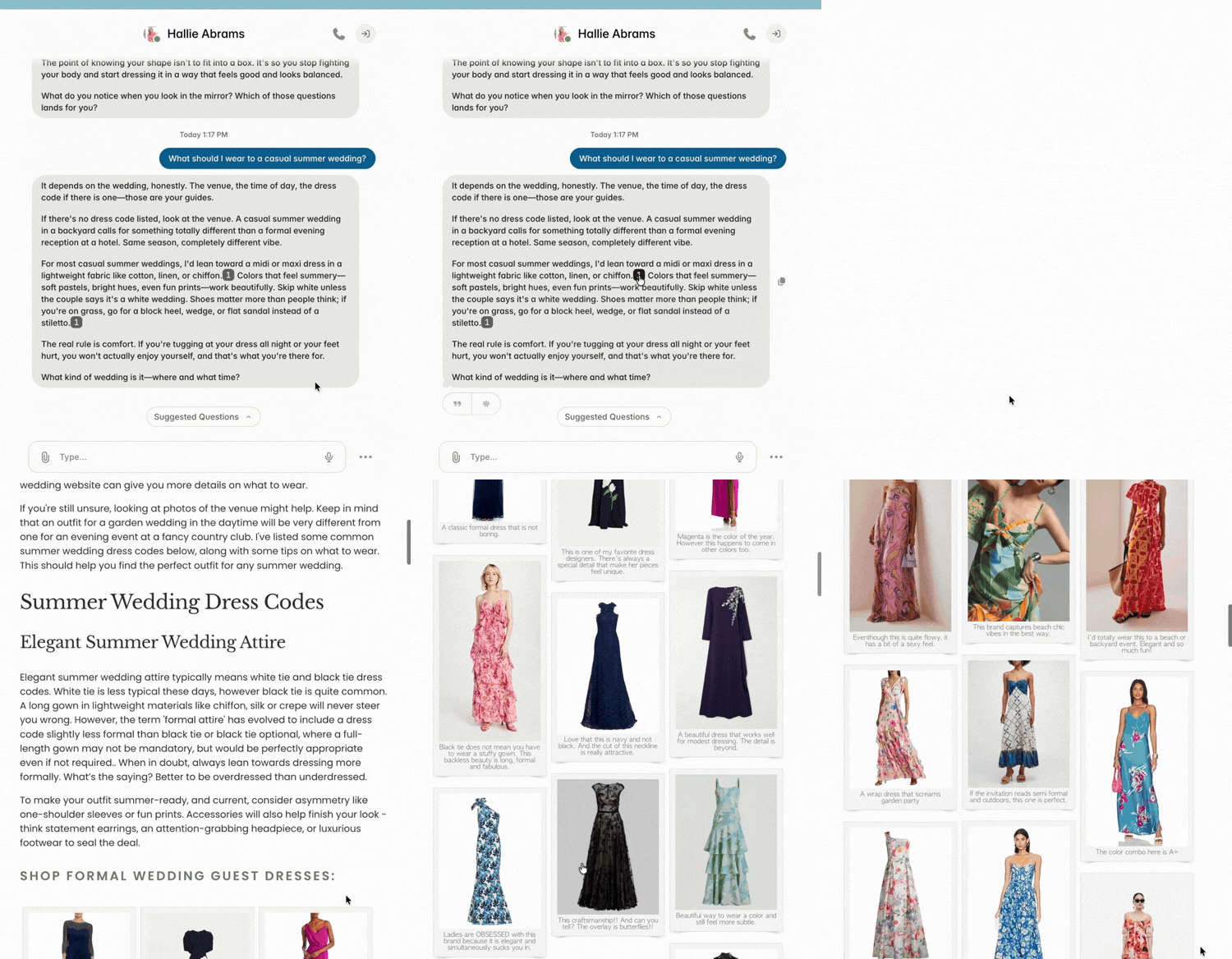
★ If you only do one thing on this page, do this one. It's where the real shopping happens. ★
3. Log in to save your chats (optional, but worth it)
You can chat with Hallie without logging in, but your conversations will disappear when you close the tab.
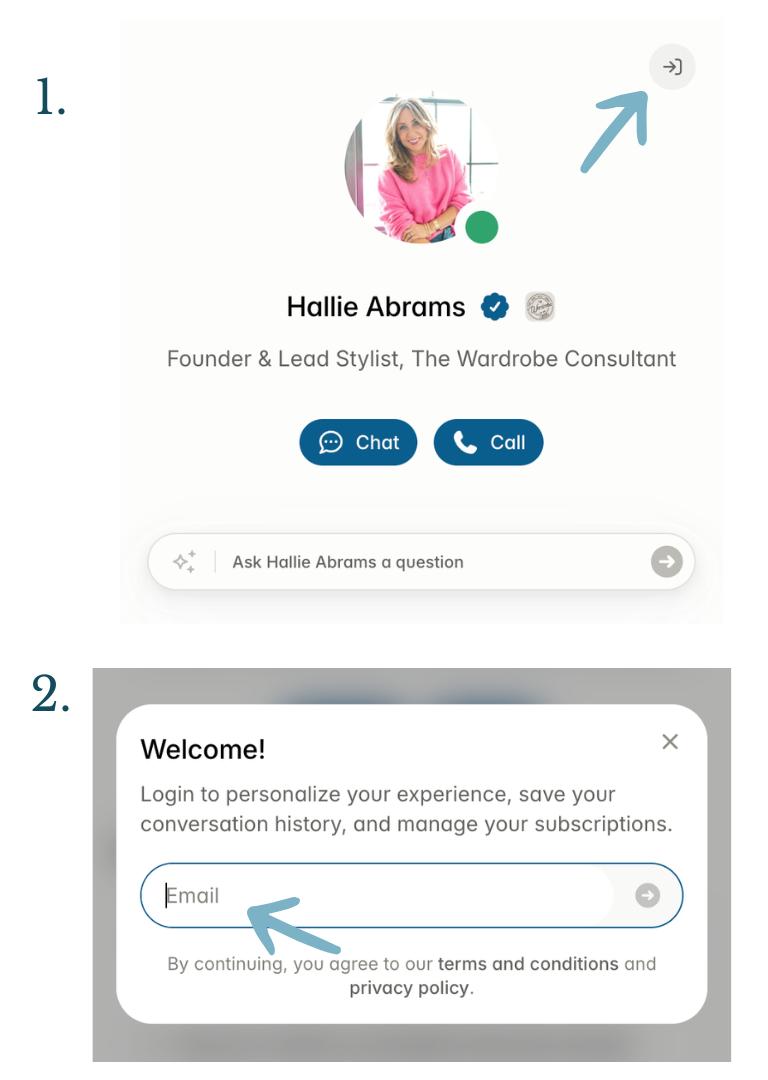
If you want her to remember what you've talked about, log in to Delphi by clicking the small arrow in the top right corner of the chat window and entering your email.
It takes 30 seconds, and from then on every conversation you have with Hallie is saved. Your chats build up over time into your own little styling archive!
Note: Delphi is the platform that Ask Hallie is built on. Creating the account is free.
4. Keep the conversation going
Hallie remembers what you've said within a single chat, so you can build on her answers instead of starting over. Got a suggestion you like but want to push on something? Just ask!
Each answer builds on the last. Just like a real styling session.
A conversation might go:
What should I wear to my daughter's college graduation?
Can you suggest more options that aren't dresses?
What about something I could wear to brunch the next day?
5. Know when to ask for a human
Hallie is built for styling questions: what to wear, how to put outfits together, what flatters your shape, how to think about your closet differently. Anything in that lane, ask her.
A few things she can't do (because they need live information or a real human):
Check current stock at specific stores or predict exact sizing for you in a particular brand.
Build a personalized shopping list with current links for a specific event.
When you need that kind of help, head to the Link Requests page. Tell us what you're looking for and you'll get a personalized roundup from a real human on the team within 3 business days.
Keep Ask Hallie close
A quick tip: bookmark this page or save it to your home screen so you can pull up Ask Hallie in one tap, whether you're at home or running out the door. One tap from the morning closet panic. That's the whole point.
On your computer
Bookmark the Chat with Hallie page in your browser (⌘+D on Mac or Ctrl+D on Windows
On your iphone
Open the Chat with Hallie page in Safari, tap the share icon, and select "Add to Home Screen." Ask Hallie will live on your phone like any other app.
On your android
Open the Chat with Hallie page in Chrome, tap the three-dot menu in the top right, and select "Add to Home screen.”
One more thing!
Don't overthink it. The best way to figure out Ask Hallie is to just start chatting. Ask a question, see what comes back, ask another one. You'll find your rhythm quickly, I promise.
Ready when you are!